Quick answer
Paste a small set of notes into ChatGPT, ask it to organize only what is written, then check every row against the original. A tidy table can still change the meaning.
In our November 3, 2026 web test, ChatGPT added an approval task that the notes never assigned. A focused follow-up removed it, but other wording still needed manual attention.
1. Start with one small set of notes
Keep the original notes beside the answer. Use a ChatGPT web session you are authorized to use; no file upload or connected app is needed.
Our test used the logged-out ChatGPT website. Login buttons were visible, and no model name was shown. Inputs and answers were English; surrounding controls were Chinese. Your interface may differ.
These practice notes are entirely fictional.
2. Ask for a checklist, not a new plan
This is the request we actually sent:
Turn these fictional notes into a checklist for me to review. Use only the notes, not outside information. Reply in English.

Use a table with Action | Owner | Deadline | Condition or supporting words. Write "not provided" for any missing owner or deadline. Keep requests as requests, not promises. Preserve all conditions. Separate completed items, undecided ideas, and background from open actions. Do not invent tasks or calendar dates. Do not send messages, set reminders, or perform any task.

Notes:
Nora will print 12 flyers by Friday.
We need to book a room; nobody has agreed to do that yet.
The event is on Saturday.
Last year's room was noisy.
Ask Lee whether they can bring a speaker.
We have not decided whether to serve tea.
Mina has already sent the invitations.
Only if the room is confirmed, Sam will order 10 chairs by Thursday.
Nora may publish the flyer only after Maya approves it; no approval has been given.
“Owner” means the person responsible for doing something. If the notes do not name that person, leave the gap visible. For help shaping your own request, see how to ask ChatGPT better questions.
OpenAI’s prompting guidance recommends giving the goal, context, desired output and boundaries. Clear instructions do not guarantee correct output.
3. Check every task against the notes
Read each result row, then find its supporting words in the original. Next, read the original from beginning to end to catch anything missing.
Our first answer kept Nora’s 12 flyers and Friday deadline, Sam’s 10 chairs and Thursday deadline, and the room-confirmation condition. Missing owners and dates stayed “not provided.” Mina’s invitations were correctly marked completed. Saturday stayed the event date, not a deadline imposed on other tasks.
But the answer also added “Obtain Maya’s approval of the flyer,” assigned to Maya. The notes only made approval a condition; they did not assign a separate task to obtain it.
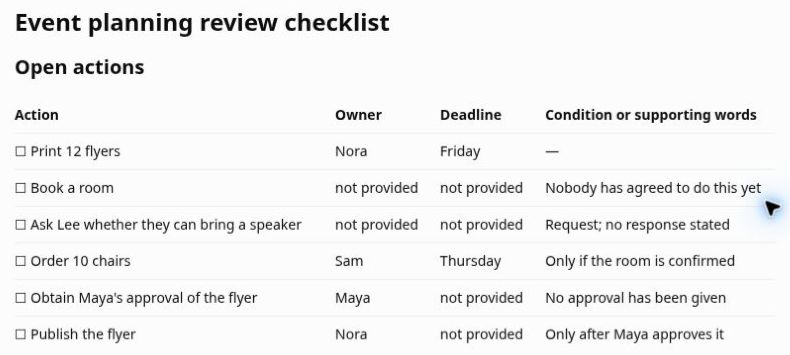
English open-actions table cropped from the actual first answer, November 3, 2026. Scroll sideways to read all columns, or open the screenshot full size.
There were subtler problems too. “May publish” became an unchecked publication task, making permission look like a commitment. The undecided tea idea became “Decide whether to serve tea,” and the noisy-room background became “Consider last year’s room experience.” These were not accurate copies of what the notes said.
4. Fix one omission or unsupported detail
We stayed in the same conversation and sent this focused correction:
Correct only the extra approval task. The notes say ‘Nora may publish the flyer only after Maya approves it; no approval has been given.’ They do not assign anyone a separate task to obtain approval. Remove ‘Obtain Maya’s approval of the flyer’ from the open actions. Keep Maya’s approval, which has not been given, as the condition on Nora’s publication row. Leave all other rows and sections unchanged.
The next answer removed the extra approval task. Nora’s row now said “Only after Maya approves it; no approval has been given.”
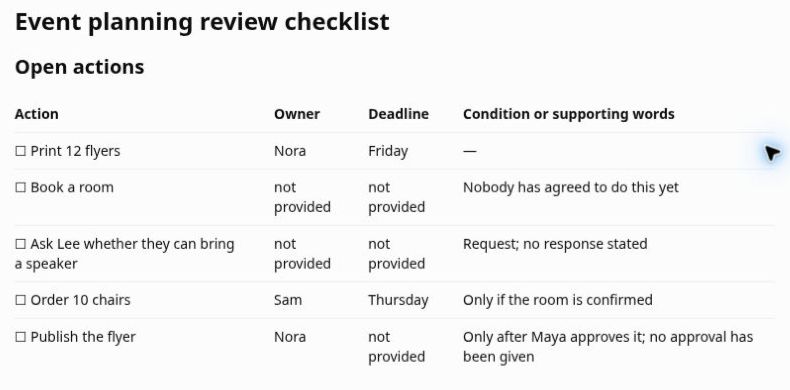
English open-actions table cropped from the actual revised answer. Scroll sideways to read all columns, or open the screenshot full size.
That specific correction worked. It did not fix the permission, tea or background wording. It also omitted the first answer’s closing review bullets, although their facts remained in the tables. One correction did not make the whole answer reliable.
5. Copy the checked list and use it
We saved a manually reviewed text copy: printing, booking, asking Lee and conditional chair ordering stayed as actions. Nora’s conditional permission went into a separate section. Mina stayed completed; tea stayed undecided; the room comment stayed background.
Resolve missing owners and dates with the people involved; do not invent them to fill the table. This checklist does not perform tasks, send messages or create reminders.
Before you rely on it
Check quantities, names, dates, completed work and words such as “only if” and “may.” Share only notes you are allowed to disclose. Asking ChatGPT to check itself is not an independent review.
OpenAI’s guidance on making results ready to use calls for checking important details and unsupported assumptions. Our AI answer-checking guide covers broader verification. Here, the original notes are your reference for what was said, not proof that anyone has since done the work.